Talk to it the way you would talk to a person
No commands to memorize, no exact phrasing and no saying it three times. One long sentence, conditions and all, in English or Spanish.
What makes Nia's voice different
"Hey Nia"
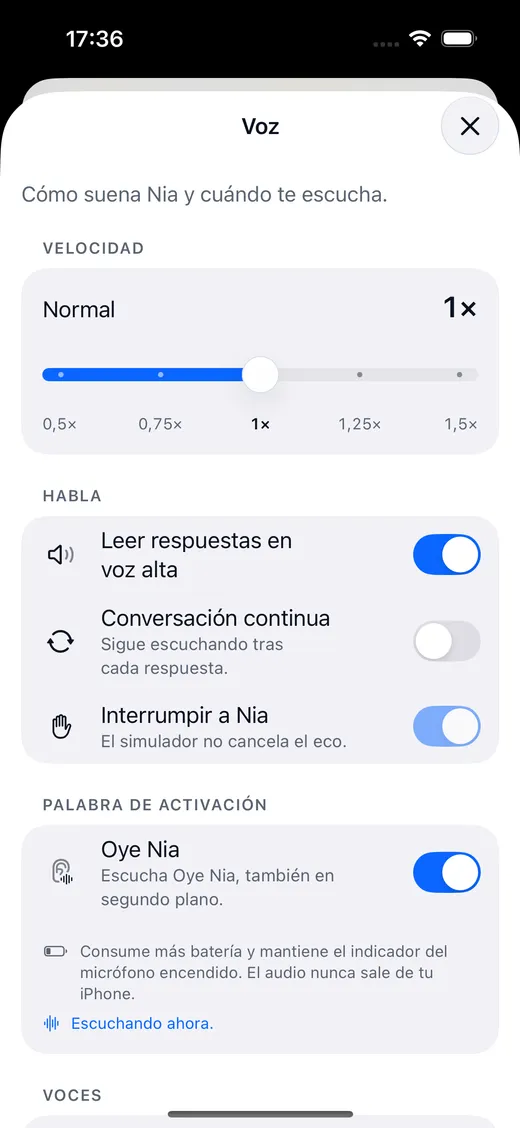
The wake word is turned on by hand in Settings, under Voice, with its battery warning. It also answers to "ok nia" and "hello nia".
Dictation stays on your iPhone
Recognition runs on the iPhone itself. What travels to the server is the text of what you said, never the recording. Group radio is switched on separately and explains itself before it sends voice.
Two languages at once
In automatic mode two recognisers run on the device and the more confident one wins. You can switch mid sentence.
You can cut it off
Talk over it while it is speaking and it stops. The microphone monitor and the recogniser share a single input node.
It does not transcribe silence
An energy gate measures every chunk of audio and only hands the recogniser what might be somebody talking. The expensive half runs only when there is a voice.
It says when it cannot
If a call, an alarm or Siri takes the microphone, it lets go, asks for it again and shows "paused" with the reason. It never says "listening" without listening.
Switching on "Hey Nia", in three steps
Open Settings and go to Voice
It is in Nia's menu, under the voice section.
Turn on the wake word
Nia shows you the battery warning before switching it on: listening continuously costs something, and you are better off knowing.
Say "Hey Nia" and what you want
If you stop at "Hey Nia" and pause, Nia waits nine seconds and takes the next sentence as the command.
This is not a bug: iOS allows it to no app but Siri. Here is why, and which three doors do open with the phone locked.
The three doors that do open
All of them leave Nia listening from the first second. None of them pretends to hear you from your pocket.
Siri
"Hey Siri, ask Nia what I have tomorrow" is answered without opening the app. "Hey Siri, talk to Nia" opens it listening.
The Action button
You assign it the "Talk to Nia" shortcut and a long press opens it already listening, with the iPhone locked too.
Control Centre
Nia's control is added like any other and works from the Lock Screen.
The voice, and how you choose it
Nia can read its answers with the system voice or with the Gemini one, which is noticeably more natural and goes sentence by sentence so it starts speaking before it has finished thinking.
- System voice: free, offline, the same one iOS uses.
- Gemini voice: on Plus, 200 spoken answers a day; on Pro, uncapped.
- Adjustable speed from 0.5× to 1.5×, and a continuous mode that keeps listening after it answers.
- The sphere beats with the voice: what you see moving is the real amplitude of the audio.

Interpreter mode
You say "be my interpreter with English" and Nia stands in the middle of a conversation in two languages: it listens, translates and speaks both ways, with its Live Activity in the Dynamic Island and a control to stop it without going back to the app. Translating a loose piece of text, on the other hand, runs on the iPhone itself with Apple's translation framework: that one does not even need a connection.
About the voice
Is Nia always listening?
No. The wake word "Hey Nia" is switched on by hand in Settings, with its battery warning, and it only works with the app open or with background audio mode on. With the app closed, Nia does not listen, and that is not a fault: iOS does not allow it to any app other than Siri. While it is listening, the orange microphone indicator is on, as it should be.
Does my voice leave the iPhone?
Dictation and the wake word are recognized on the device itself. What travels to the server is the text of what you said, so the model can understand it. Group radio is the exception: when you turn it on and hold to speak, the voice notice travels to the server to reach people in that group who turned their listening on. Reading a receipt, translating text, Nia Studio masks and your location also stay on the phone, with location rounded to a kilometre before it leaves.
Does Nia work in Spanish?
Yes, and it was built in Spanish first. It also speaks English, and in automatic mode two recognisers run at the same time on the device: the one that understands with more confidence wins, so you can change language halfway through a conversation.
Does group radio record my voice?
A voice notice is only sent when you turn radio on and hold to speak. There are no public channels and nobody can turn listening on for you. A notice lives in memory for about thirty seconds so it can reach people who chose to listen. If someone reports it, it is kept for thirty days so it can be reviewed. There is no end to end encryption and Nia does not identify anyone by their voice.
Does Nia appear outside the app?
Yes, in seven places: the Home Screen widget with your next event, the Control Centre control and the Action button, Siri and Shortcuts, the Live Activities in the Dynamic Island, Spotlight search, the share sheet in Photos and the notifications for a finished job.
Shall we begin?
Download Nia, tell it the first thing and see what happens. The free plan asks for no card.
Free to start. Requires iOS 18. In English and Spanish.