"Add dinner with Luis on Thursday at 9 at Casa Lucio"
Creates the event in your Calendar, geocodes the place and sets the alert you ask for. If the phone's calendar will not accept writes, it uses your Google Calendar.
This is not a list inside another app: Nia writes into the iPhone's own Calendar and Reminders, and what it creates shows up in Apple's apps as if you had put it there yourself.
"Add dinner with Luis on Thursday at 9 at Casa Lucio and warn me an hour before"

A reminder with a time always carries its alarm. Measured: a due date with no alarm notifies nobody, so Nia never leaves one without it.
A reminder for a loose day gets no invented midnight alarm: it appears with that day's reminders, and Nia says so instead of promising you an alert.
"Remind me to buy milk when I leave work". The "always" location permission is asked for right there, the first time, and never at sign up.
Daily, weekly by day, monthly by date, yearly or every n. And a repeating one does not close when you tick it: it rolls to the next date, and Nia says so.
Work, Home, Groceries: the ones you already have in Reminders. Nia reads them and writes into the one you name.
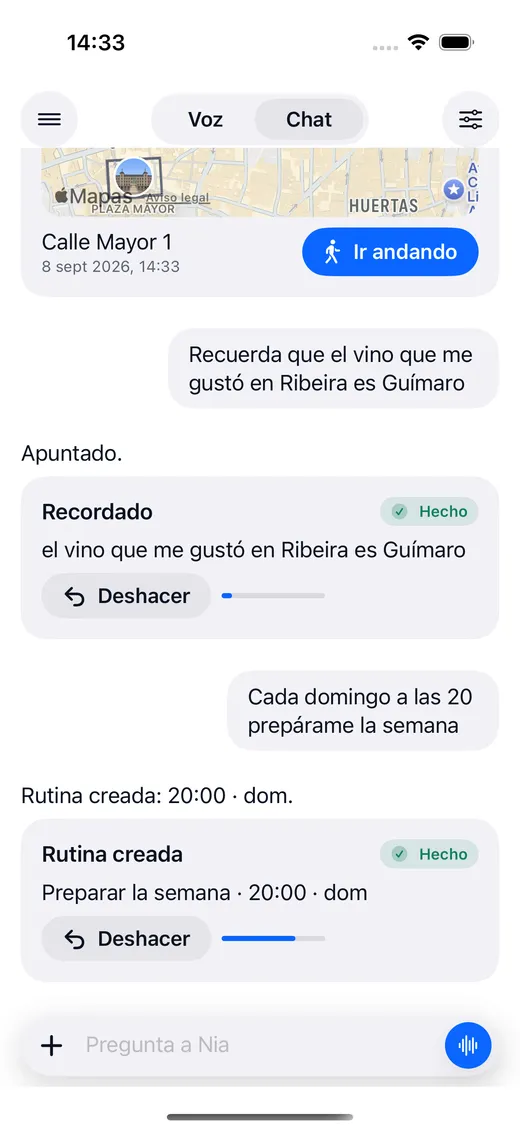
Creating, changing, completing and deleting all have an undo button on the card. Delete and undo writes it back, with a new identifier.
Nia uses AlarmKit, the framework Apple opened for this, so its alarms ring even with the phone on silent or a Focus mode on, just like the ones in Clock.
"Add dinner with Luis on Thursday at 9 at Casa Lucio"
Creates the event in your Calendar, geocodes the place and sets the alert you ask for. If the phone's calendar will not accept writes, it uses your Google Calendar.
"What have I got tomorrow?"
Reads the iPhone Calendar and your Google Calendar as a single calendar, with no duplicates, and tells you which sources it could read and which it could not.
"Move the 10 o'clock meeting to 12"
Moves the event wherever it is, keeping its length.
"Remind me to buy milk when I leave the house"
Creates the reminder with day, time, repeat, notes, link, priority, list, or on arriving at or leaving a place. A time always carries an alarm; a day with no time gets no alarm invented for it.
"Which reminders are overdue?"
Today, tomorrow, this week, overdue, undated, completed or all of them, with the real lists from your phone.
"Change the dentist one to five o'clock"
Time, day, text, notes, link, priority, list and repeat. The alarm moves with the time.
"Mark the pharmacy one as done"
Closes it. If it repeats it does not close: it moves on to the next date and Nia tells you so.
"Delete the reminder for the service"
Deletes it, and undo writes it back.
"Set an alarm for seven"
Creates the alarm with AlarmKit: it rings on silent and with a Focus mode on.
"Ten minute timer"
A countdown with AlarmKit.
"What alarms have I got set?"
Lists the alarms and the timers that are running.
"Take off the seven o'clock alarm"
Cancels the alarm or the timer.
"How is my day looking?"
Your calendar, the weather, how long it takes you to get to the first thing, your contacts' birthdays and what is sitting in the Gmail inbox.
"Tomorrow at eight, find me flights to Rome"
The job runs on its own on the server and the answer reaches you as a notification, with your phone in your pocket.
"What jobs have you got pending?"
What Nia has in hand, and for when.
"Cancel the flights one"
Cancels the job.
"Every day at eight, tell me about my day"
A routine with a trigger of time, of place or of a system event, and any Nia action behind it.
Nia is an AI voice assistant for iPhone. You speak to it or type to it in plain language and it actually does things on your phone: create events in Calendar, set reminders and alarms, find places, generate images, read your Gmail, turn the lights on or leave you a WhatsApp message written and ready. It is not a chat that explains how to do it: it is an assistant that does it.
Siri is the system assistant and it wins on one thing: it listens with the iPhone locked and the app closed, because it runs on a coprocessor no third party app can reach. Nia wins on the rest: it understands a long sentence with several conditions, remembers what you tell it, chains several actions in one turn, searches Google, reads your documents and gives you routines and jobs that run on their own. And when it cannot do something, it says so, instead of opening a web search.
Yes, on the Plus plan. You connect the account in Settings, under Integrations, and Nia reads your Google Calendar alongside the iPhone calendar as a single diary with no duplicates, summarizes your Gmail inbox, sends real emails and searches Google Drive by name and by content.
Almost all of it. The result card carries an undo button when the action can be undone: an event created, a reminder, an alarm, a routine, something you have just saved. When it cannot, as with an email already sent or a photo deleted, the card does not offer a button that would be lying.
Yes, on the Plus plan. A routine fires at a given time, when you arrive somewhere or on a system event. And a job ("tomorrow at eight, find me flights to Rome") runs on the server and the answer reaches you as a notification, with the phone in your pocket.
Download Nia, tell it the first thing and see what happens. The free plan asks for no card.
Free to start. Requires iOS 18. In English and Spanish.