This is Nia. The AI voice assistant for iPhone that actually does things.
You ask it for things. In your own words.
Just say it.
It reads the whole sentence and takes out what matters.
And it does it.
The action, done. With a button to undo it.
- 63real actions on your iPhone
- 32of them on the free plan
- 7places in iOS where it shows up unopened
- 0seconds of your audio leave the phone
It does not explain how. It does it.
Most AI assistants finish with a paragraph and a "would you like help with anything else?". Nia finishes with the event in your Calendar, the reminder with its alarm, and the message written in WhatsApp waiting for you to press send.
- Done Nia does it, and it is done.
Events, reminders, alarms, images, lights, email, notes. The card carries a button to undo it whenever undoing is possible.
- Ready It writes it and you send it.
WhatsApp, Messages, calls and Uber. This is not Nia being cautious: iOS lets no app send on your behalf. Nia will never tell you it sent something.
- Shortcut It writes the whole Shortcut for you.
It compiles the steps, signs the file and opens Apple's import sheet. You press Add. The card warns you that until then it does not exist.

63 actions, not 63 promises
Every one of them exists, with its implementation, its test and its result card. When something cannot be done, it says so, which is the hard part.
Calendar, reminders and alarms
The iPhone's Calendar, Reminders and Clock, written to for real, with a button to undo it.
See more →
Messages, calls and email
WhatsApp, Messages, the phone, Gmail and Telegram. What can be sent on its own is sent; what cannot, Nia leaves written for you.
See more →
Images, video and editing
Generate an image and save it to Photos, take someone out of a photo, animate a scene.
See more →
Reading, listening and translating
Scan, summarise a meeting, ask your own documents a question and interpret between two languages.
See more →
The house, the car and the world
Music, navigation, HomeKit, places nearby, where you parked and Health.
See more →
Private groups with your people
Plans, documents and voice radio in private groups that every member controls from their own phone.
See more →
Memory, character and extensions
What Nia remembers about you, how you want to be spoken to, and the skills you add yourself.
See more →
The whole catalogue
All 63 actions one by one, with what you say, what it does and which plan it is on.
See more →
Say "Hey Nia" and it is already listening
You talk normally. The whole sentence, conditions and all, with no commands to learn. You can cut it off mid answer and switch language mid conversation.
- Recognised on your iPhone. Dictation and the wake word stay there: what travels is the text. Group radio is switched on separately.
- Two languages at once. Two recognisers run and the more confident one wins.
- You can interrupt it. Talk over it while it speaks and it stops.
- Three doors with the app closed. Siri, the Action button and Control Centre open it already listening.

It remembers you, and works when you are not there
Memory
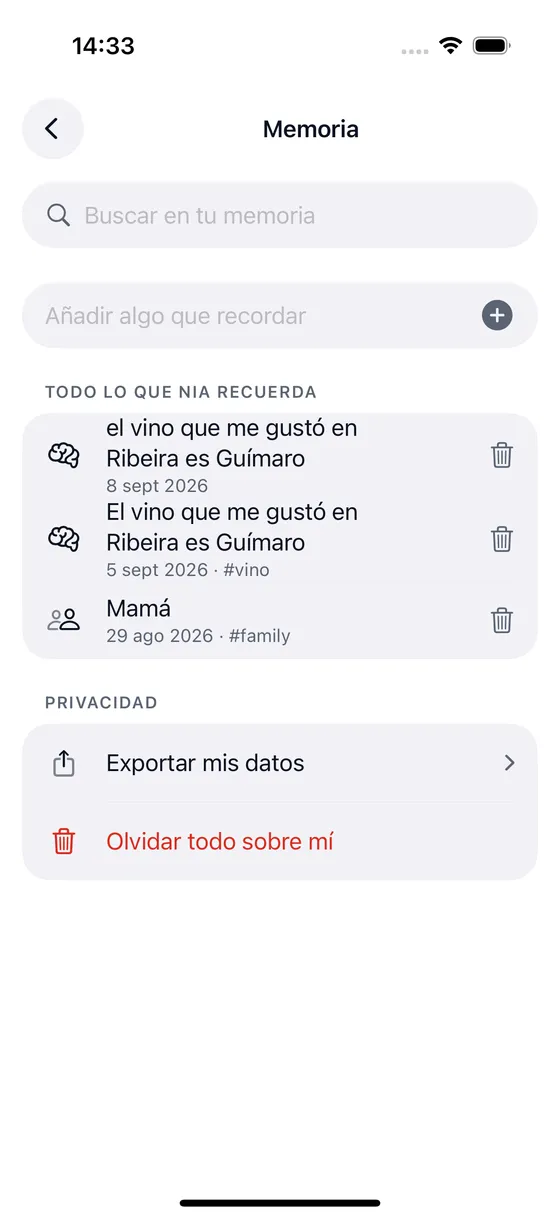
"Remember that I am allergic to shellfish" and the allergy shows up on its own the next time it looks for a restaurant. Everything it knows is on one screen: search, edit, delete.
See memory →
Routines and jobs
A routine fires at a time, on arriving somewhere or on a system event. A job runs on the server and the answer reaches you as a notification.
See routines →
Skills of your own
A phrase of yours calls your webhook or runs your Shortcut. Nia does not stop at its catalogue: you can add whatever you want it to do.
See integrations →
An ordinary day, with one thing less
Organise your work without opening five apps
One sentence goes in, and out come an event, a reminder fifteen minutes before and an email confirming it.
- "Book the client meeting for Tuesday at 10 and remind me 15 minutes before"
- "What have I got tomorrow afternoon?"
- "Move the 12 o'clock one to Thursday"
The house and the family, without being everyone's secretary
You propose the dinner once and it lands in everyone's calendar, on their own phone.
- "Create a group with my family"
- "Propose dinner on Saturday at nine at home"
- "Add milk and bread to the group's shopping list"
With your hands full
You talk to her and she keeps talking back. Nothing to look at, nothing to touch.
- "Hey Nia, where did I park?"
- "Take me to my parents' house on Waze"
- "Tell Marta I will be there in twenty minutes"
Remembering for you
You tell her once. Next time she already knows.
- "Remember that I am allergic to shellfish"
- "Note down that I took the car in for a service in March"
- "What did I tell you about the flat?"
What stays on the iPhone, stays
Nia is not honest as a marketing line: it is honest because it is written in the code and can be checked. These things never leave your phone.
- Your voice. Dictation and the wake word are recognised on the device. Group radio only sends voice when you turn it on and hold to speak.
- Your address book. It is read on the phone to work out who you are writing to, and it stays there.
- Your receipts and your meetings. They are read and transcribed right there.
- Your exact location. It is rounded to about a kilometre before it travels.
- Your passwords. If you say one out loud, Nia does not store it: it spots that it is a password and asks you.
Start free. No card.
The free plan is not a watermarked demo: it is 5 real commands a day and 3 images in HD, with calendar, reminders, maps, messages and groups all open.
Free
To see whether Nia is for you. No card.
EUR 0 / month
Forever
- 5 commands a day
- 3 HD images, free of charge
- Calendar, reminders, alarms and timers
- WhatsApp, Messages and calls, written and ready
- Maps, places nearby, navigation and Uber
Plus
The everyday plan. Nia remembers you.
EUR 10.83 / month
billed yearly, or EUR 12.99 a month
- 60 commands a day
- 25 images a month, 3 of them in 4K
- Memory: Nia remembers what you tell her
- Routines and jobs that run on their own
- Wake word "Hey Nia"
Pro
No counter to keep an eye on, plus video and Health.
EUR 24.99 / month
billed yearly, or EUR 29.99 a month
- 300 commands a day
- 60 images a month, 10 of them in 4K
- 6 videos a month
- Gemini voice with no cap
- Health: read and write in Apple Health
What people usually ask
What is Nia?
Nia is an AI voice assistant for iPhone. You speak to it or type to it in plain language and it actually does things on your phone: create events in Calendar, set reminders and alarms, find places, generate images, read your Gmail, turn the lights on or leave you a WhatsApp message written and ready. It is not a chat that explains how to do it: it is an assistant that does it.
How is Nia different from Siri?
Siri is the system assistant and it wins on one thing: it listens with the iPhone locked and the app closed, because it runs on a coprocessor no third party app can reach. Nia wins on the rest: it understands a long sentence with several conditions, remembers what you tell it, chains several actions in one turn, searches Google, reads your documents and gives you routines and jobs that run on their own. And when it cannot do something, it says so, instead of opening a web search.
Is Nia always listening?
No. The wake word "Hey Nia" is switched on by hand in Settings, with its battery warning, and it only works with the app open or with background audio mode on. With the app closed, Nia does not listen, and that is not a fault: iOS does not allow it to any app other than Siri. While it is listening, the orange microphone indicator is on, as it should be.
Does my voice leave the iPhone?
Dictation and the wake word are recognised on the device itself. What travels to the server is the text of what you said, so the model can understand it. Group radio is the exception: when you turn it on and hold to speak, the voice notice travels to the server to reach people in that group who turned their listening on. Reading a receipt, translating text, Nia Studio masks and your location also stay on the phone, with location rounded to a kilometre before it leaves.
Can Nia send a WhatsApp message for me?
It leaves it written and open, and you press send. That is not a decision Nia makes: iOS gives no app a way to send a WhatsApp message, send a text or make a call on your behalf. Nia resolves the contact in your address book, writes the message and opens the app on the right conversation. It will never tell you it has sent it.
Does Nia work in Spanish?
Yes, and it was built in Spanish first. It also speaks English, and in automatic mode two recognisers run at the same time on the device: the one that understands with more confidence wins, so you can change language halfway through a conversation.
Can I undo what Nia does?
Almost all of it. The result card carries an undo button when the action can be undone: an event created, a reminder, an alarm, a routine, something you have just saved. When it cannot, as with an email already sent or a photo deleted, the card does not offer a button that would be lying.
Shall we begin?
Download Nia, tell it the first thing and see what happens. The free plan asks for no card.
Free to start. Requires iOS 18. In English and Spanish.